





































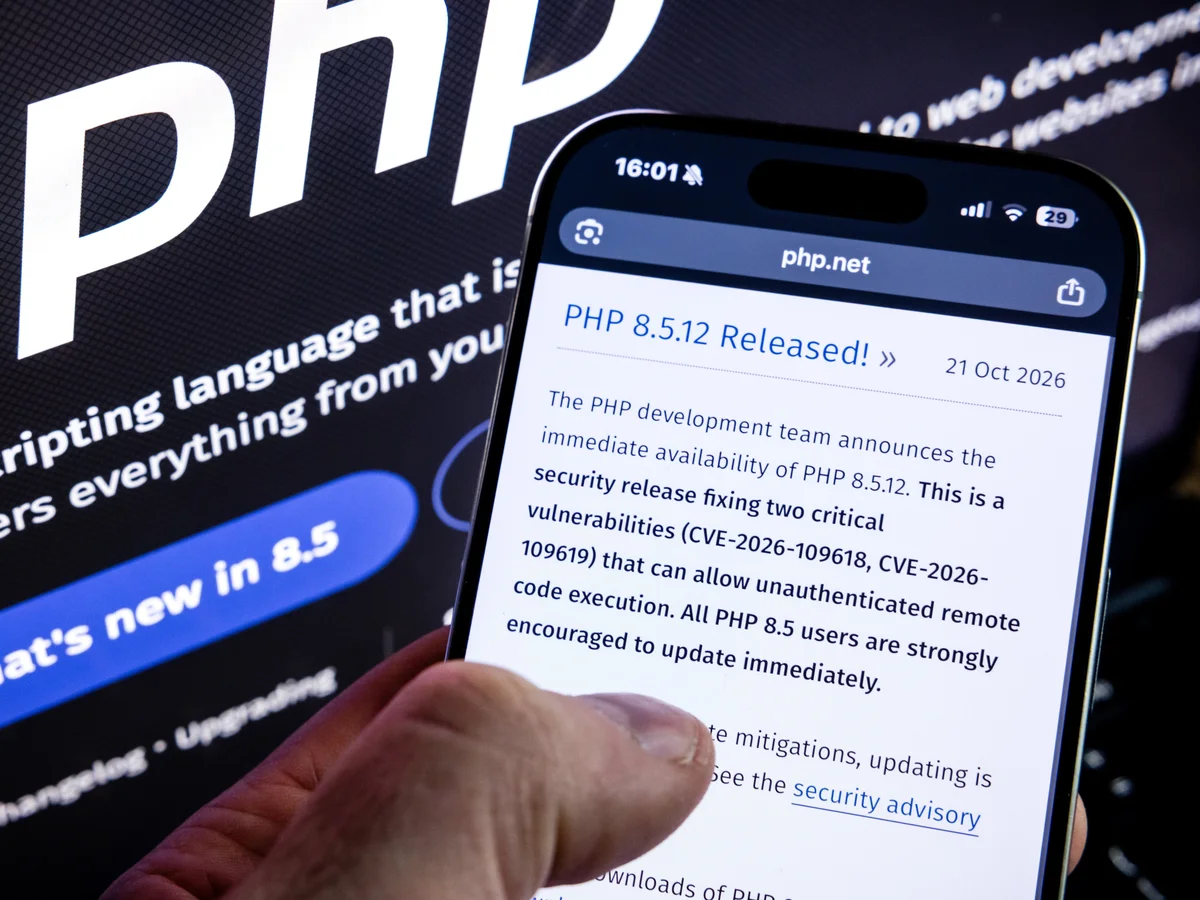
YES! Millions of websites could face serious cybersecurity risks following the disclosure of two critical vulnerabilities in PHP, one of the most widely used programming languages on the internet.
According to GhanaSky.com editor, the security flaws, identified as CVE-2026-109618 and CVE-2026-109619, were publicly disclosed in October 2026. They could allow attackers to execute malicious code on vulnerable web servers without logging in or obtaining permission first. Both vulnerabilities received a critical severity rating of 9.2 out of 10.
The development has prompted urgent warnings from cybersecurity authorities and technology companies. Some government agencies, businesses, and public institutions have temporarily taken websites and online services offline while working to secure their systems. These precautionary shutdowns are intended to reduce the risk of an attack while security updates are installed and tested. https://www.cert.europa.eu/publications/security-advisories/2026-018
The incident has raised important questions for website owners, online businesses, WordPress administrators, government agencies, and ordinary internet users.
What is PHP? Why does it power so many websites? Which versions are vulnerable? Have the security flaws been fixed, or are solutions still being developed? And what should people do immediately to protect their websites, accounts, and personal information?
Here is everything you need to know about the critical PHP security vulnerabilities and their potential impact on the internet.
What Is PHP? What Does PHP Stand For?
PHP stands for PHP: Hypertext Preprocessor. It is a free, open-source, server-side programming language primarily used to build websites, web applications, and online services.
PHP originally stood for Personal Home Page when it was first developed. The name later evolved into the recursive acronym PHP: Hypertext Preprocessor.
Unlike HTML, which structures the content displayed on a webpage, PHP executes instructions on a web server. It can process user requests, communicate with databases, authenticate users, manage website content, and generate the information that visitors see in their browsers.
For example, when someone visits a WordPress website, PHP may retrieve an article from a database, load the website’s settings, process plugins, and generate the page displayed to the visitor.
The visitor normally receives the generated webpage rather than the server’s original PHP source code.
PHP is widely used because it is flexible, relatively inexpensive to deploy, supported by many hosting providers, and compatible with popular content management systems and web applications.
How Does PHP Power Most Websites on the Internet?
PHP plays a major role in the infrastructure behind the modern internet.
Technology estimates have indicated that PHP is used by nearly 70% of websites whose server-side programming language can be identified. The exact percentage depends on the measurement method and the websites included in the survey. https://www.reuters.com/technology/what-is-php-why-did-it-take-government-websites-offline-2026-10-21/
Popular platforms and applications that use PHP include:
- WordPress: A widely used content management system powering blogs, news websites, business websites, and online publications.
- WooCommerce: An e-commerce platform built on WordPress that enables businesses to sell products and services online.
- Drupal: A content management system used by government agencies, businesses, universities, and other organisations.
- Joomla: A content management system used to create and manage websites and online applications.
- Laravel: A PHP framework used by developers to build sophisticated web applications and backend systems.
- Custom PHP applications: Websites, customer portals, membership systems, booking platforms, payment-related applications, and internal business tools.
PHP is also used in systems that visitors may not recognise as PHP-based. A website might use PHP behind the scenes even when its interface is built with JavaScript or another technology.
This widespread adoption explains why a vulnerability in the PHP runtime can have consequences across multiple industries.
A single weakness in the underlying software may affect many unrelated websites, even if those websites have different designs, owners, hosting providers, and purposes.
What Is the PHP2Shell Security Vulnerability?
The term PHP2Shell has been used in reporting about the October 2026 security incident involving two critical PHP vulnerabilities.
The issues are tracked under these identifiers:
| Vulnerability | Severity | Potential impact |
|---|---|---|
| CVE-2026-109618 | Critical — CVSS 9.2 | Memory-handling flaw that could enable remote code execution |
| CVE-2026-109619 | Critical — CVSS 9.2 | Improperly managed internal state that could enable remote code execution |
Source: CERT-EU, October 2026 security advisory.
1. CVE-2026-109618: A memory-handling vulnerability
This vulnerability involves how PHP handles certain out-of-memory conditions.
Under specific circumstances, an error can interrupt the processing of a request while internal data is only partially initialised. Subsequent cleanup operations may incorrectly handle that data.
An attacker could potentially exploit this behaviour to corrupt memory and execute malicious code.
2. CVE-2026-109619: A problem with stale internal state
The second vulnerability concerns internal information that may remain accessible after the memory associated with a request has been released.
If a later request uses that stale information before the appropriate initialisation occurs, an attacker may be able to exploit the resulting memory-management error.
Both vulnerabilities are particularly serious because they can potentially be triggered before an application’s own PHP code runs. This means that updating WordPress plugins alone cannot eliminate the underlying problem.
The vulnerabilities affect the PHP runtime itself, rather than being limited to one WordPress theme or plugin. The exact risk depends on the PHP version and server configuration. https://www.cert.europa.eu/publications/security-advisories/2026-018
How Can Hackers Exploit PHP Vulnerabilities?
A vulnerability is a weakness in software that an attacker may be able to exploit. In this case, the affected PHP runtime may mishandle internal memory or request-processing operations.
A potential attack can follow several stages.
Step 1: Identify vulnerable servers. Attackers scan publicly accessible systems to identify servers running affected PHP versions or configurations.
Step 2: Send a specially crafted request. A vulnerable server may process a malicious request that triggers the memory-handling weakness.
Step 3: Attempt to execute unauthorised code. If exploitation succeeds, the attacker may gain the ability to run commands within the compromised environment.
Step 4: Attempt further compromise. Depending on the permissions and configuration of the server, an attacker may attempt to steal information, alter website files, install malicious software, or move into other systems.
Step 5: Abuse the compromised website. A hacked server could be used to distribute malware, redirect visitors to fraudulent websites, send spam, or attack other online services.
These are potential consequences, not proof that every vulnerable website has been compromised. A vulnerability can exist without being exploited, and successful exploitation does not necessarily grant an attacker unrestricted control of every connected system.
Nevertheless, organisations must treat these flaws seriously because unauthenticated remote code execution can create a direct path into exposed systems.
Which PHP Versions Are Vulnerable?
The October 2026 PHP security incident affects a broad range of PHP versions.
According to the published security information, PHP versions from 5.4 through 8.5.11 are affected by these two vulnerabilities. The PHP project released patched versions for supported branches on 21 October 2026.
The following versions contain the fixes:
| PHP branch | Patched version | Recommended action |
|---|---|---|
| PHP 8.5 | 8.5.12 | Update to the patched release or a later secure release |
| PHP 8.4 | 8.4.27 | Update to the patched release or a later secure release |
| PHP 8.3 | 8.3.36 | Update to the patched release or a later secure release |
| PHP 8.2 | 8.2.35 | Update to the patched release or a later secure release |
| PHP 8.1 and earlier | No upstream fix for these branches | Migrate to a supported PHP branch and install its security updates |
Source: Google Cloud’s security response, 21 October 2026. https://cloud.google.com/blog/products/identity-security/responding-to-core-php-vulnerabilities-cve-2026-109618-cve-2026-109619
Important: A version number alone is not enough to determine whether a server is protected. Hosting providers sometimes apply security fixes through their own packages, so administrators should confirm the actual patch status with their provider. Conversely, an unsupported PHP branch should not be assumed safe simply because it is running reliably.
PHP 8.1 and older branches no longer receive upstream security fixes for these vulnerabilities. Organisations running these versions should plan an urgent migration rather than relying on a permanent workaround.
Are the PHP Vulnerabilities Fixed, or Is a Solution Still on the Way?
The emergency fixes have already been released. Website owners should not wait for a future patch before taking action.
The PHP development team published patched releases on 21 October 2026. European cybersecurity authorities subsequently advised organisations to apply the available updates immediately and to consider isolating exposed systems if they could not be secured promptly. https://www.enisa.europa.eu/news/joint-statement-on-critical-php-vulnerabilities
However, the release of a fix does not automatically protect every website.
There are three separate issues to consider:
- The software fix exists. Administrators can update supported PHP installations to the patched releases.
- Deployment may still be incomplete. Some hosting providers, organisations, and application owners need to install updates, rebuild server images, restart services, or redeploy applications.
- Existing compromises require investigation. Patching prevents exploitation of the fixed vulnerabilities, but it does not automatically remove malicious files or reverse damage caused by an earlier successful attack.
Reports of exploitation attempts and circulating proof-of-concept material make prompt remediation particularly important. Organisations should check current security advisories for changes to the threat assessment.
For users, the key question is not simply whether a patch has been released. It is whether the particular website or online service they rely on has actually been secured.
Why Are Government and Business Websites Going Offline?
Government portals, financial services, hospitals, news websites, and business platforms depend on reliable server infrastructure.
When a critical vulnerability allows attackers to potentially execute code without authentication, leaving a vulnerable service publicly accessible can create an unacceptable risk.
That is why some organisations have temporarily restricted access to websites and online services while security teams apply patches and check their systems.
Reported disruptions following the October 2026 PHP warnings included services operated by government bodies, public institutions, and commercial organisations in several countries. Some organisations also temporarily suspended particular systems while assessing their exposure. https://www.reuters.com/technology/websites-taken-offline-over-php-risks-2026-10-21/
Why would an organisation shut down its website instead of simply updating it?
Updating production systems is not always instantaneous.
A large organisation may have hundreds of servers, multiple PHP versions, custom applications, and software that must be tested before deployment. Some applications may depend on outdated PHP features or third-party components.
Security teams must also determine whether the update has been applied correctly and whether other weaknesses remain.
If a system cannot be patched immediately, temporarily disconnecting it from the public internet may be safer than leaving a known, critical vulnerability exposed.
A website being offline does not necessarily mean hackers have taken it over. In many cases, a temporary shutdown is a preventive security decision.
What Does the PHP Security Crisis Mean for Individuals?
Ordinary internet users may never install PHP or directly interact with it. Nevertheless, they rely on websites and online services that use it.
The consequences of a successful attack could include several types of harm.
1. Personal information could be exposed
A compromised website may store names, email addresses, contact details, account information, or other personal data.
If an attacker gains access to that information, it could potentially be used for fraud, identity theft, targeted scams, or further attacks.
The actual information at risk depends on what the organisation stores and how its systems are configured.
2. Online accounts could become targets
Attackers may attempt to use information obtained from one service to target accounts on other platforms.
People who reuse passwords across multiple websites face a greater risk if one of those services is compromised.
Use a unique password for every important account and enable multifactor authentication wherever possible.
3. Fake websites and phishing messages may increase
Criminals may exploit security incidents to send messages claiming that a person’s bank account, email account, or online subscription requires urgent verification.
Some messages may imitate legitimate security notifications.
Do not click unexpected links or provide passwords, banking details, or verification codes in response to suspicious messages.
Instead, visit the organisation’s official website using a known address or contact its support team through a trusted channel.
4. Some online services may temporarily become unavailable
Users may be unable to access government services, business portals, online publications, or other platforms while operators perform security updates.
For services involving healthcare, payments, travel, or public administration, this may cause inconvenience or delays.
Where an organisation provides an official alternative channel, use that channel until normal service is restored.
5. A security warning does not mean your device is infected
The PHP vulnerabilities primarily concern vulnerable server-side software. They do not automatically mean that every visitor’s smartphone, laptop, or personal computer has been compromised.
Individuals should remain alert, but there is no reason to assume that a device is infected simply because a website they visited uses PHP.
What Should WordPress Website Owners Do Immediately?
WordPress is built primarily on PHP. Therefore, WordPress administrators should take the incident seriously, even if their websites appear to be working normally.
Updating WordPress itself is not the same as updating PHP. The PHP runtime is generally managed through the hosting environment, server configuration, or deployment process.
Use the following checklist.
Step 1: Check the PHP version
Log in to your WordPress dashboard and navigate to:
Tools → Site Health → Info → Server
Look for the PHP version reported by WordPress.
You can also check the PHP version through your hosting control panel or ask your hosting provider.
Do not assume that the PHP version on your local computer is the same version used by your live website.
Step 2: Contact your hosting provider
Ask your hosting provider to confirm:
- Which PHP version is running on your live website.
- Whether the relevant PHP2Shell security fixes have been installed.
- Whether all web-facing PHP processes and workers are running the patched version.
- Whether the provider has detected suspicious activity involving your account or server.
- Whether any additional steps are required to complete the update.
If your provider manages PHP centrally, it may be able to apply the fix without requiring you to modify the website yourself.
Step 3: Update to a patched PHP release
For a supported PHP branch, verify that the installed runtime includes the security fixes.
The October 2026 patched releases are PHP 8.2.35, 8.3.36, 8.4.27, and 8.5.12.
Where possible, select a currently supported PHP version that is compatible with your website, plugins, themes, and hosting environment.
Do not switch PHP versions blindly on a live website. Test compatibility and arrange a rollback plan with your hosting provider if necessary.
Step 4: Back up your website
Before making significant server or application changes, create a verified backup of:
- Website files.
- The WordPress database.
- Configuration files.
- Important uploads and business data.
Store a backup securely outside the website’s normal hosting environment where possible. Confirm that the backup can be restored.
A backup is not a replacement for a security patch, but it can help with recovery if an update causes problems or an investigation reveals damage.
Step 5: Update WordPress, themes, and plugins
Install the latest appropriate security updates for WordPress core, plugins, and themes.
Remove unused plugins and themes, especially those that are abandoned or no longer receive security updates.
These steps reduce other security risks, although they do not replace the PHP runtime patch.
Step 6: Review suspicious activity
Look for unexpected administrator accounts, unfamiliar files, suspicious scheduled tasks, unexplained redirects, unusual login attempts, and unexpected changes to website content.
Review available server and security logs for suspicious requests or activity around the period when the vulnerabilities became public.
If you suspect a compromise, involve your hosting provider or a qualified incident-response specialist. Patching alone may not be sufficient.
Step 7: Confirm the website is secure
After updating, confirm the active PHP version, check that the relevant services have restarted or redeployed where necessary, test important website functions, and verify that security monitoring is operating correctly.
Do not publicly announce that a website is completely secure merely because its homepage loads successfully.
What If Your Website Uses an Outdated PHP Version?
Websites running PHP 8.1, PHP 7.4, PHP 7.3, PHP 7.2, or older versions require particular attention.
These branches have reached end of life and are not receiving the upstream fixes for the October 2026 vulnerabilities.
A practical migration plan should include:
- Identifying the applications and plugins that depend on the old version.
- Creating a verified backup.
- Testing the application against a supported PHP branch.
- Updating incompatible plugins, themes, and application code.
- Deploying the patched PHP runtime.
- Checking logs and monitoring for signs of compromise.
If immediate migration is impossible, work with the hosting provider to restrict exposure. For a vulnerable public-facing system that cannot be secured promptly, temporary isolation may be necessary.
Do not assume that a web application firewall or a security plugin fully neutralises a vulnerability in the underlying PHP runtime.
Can WordPress Automatic Updates Fix the PHP Vulnerabilities?
Not by themselves.
WordPress automatic updates can install eligible updates to WordPress core and, depending on configuration, plugins and themes. They do not normally change the PHP runtime installed by the hosting provider.
For example, a website could be running the latest WordPress release and still use a vulnerable PHP version on its server.
Website owners should therefore check two separate things:
- Is WordPress and its installed software up to date?
- Is the server’s PHP runtime patched and supported?
Both are essential parts of website security.
What About Websites Hosted on Cloud Platforms?
The response depends on how the application is deployed.
Some managed services update supported runtimes automatically. Other services require administrators to rebuild containers, deploy a new runtime, update a virtual machine, or restart affected processes.
Google Cloud’s October 2026 guidance, for example, distinguishes between automatically updated supported serverless runtimes and deployments where customers must rebuild or redeploy their applications. Custom runtimes and older, unsupported versions may require additional work. https://cloud.google.com/blog/products/identity-security/responding-to-core-php-vulnerabilities-cve-2026-109618-cve-2026-109619
Organisations using cloud infrastructure should not assume that their provider has automatically secured every workload. They should verify the exact service, runtime, deployment method, and patch status.
The same principle applies to virtual private servers, dedicated servers, containers, and shared hosting.
How Can Website Owners Prevent Future PHP Security Problems?
The PHP vulnerabilities highlight the importance of maintaining a long-term security strategy.
Website owners should adopt the following practices.
Keep PHP supported and patched. Monitor official PHP security releases and migrate away from branches that have reached end of life.
Maintain WordPress and other applications. Update core software, plugins, frameworks, dependencies, and themes.
Use strong authentication. Require unique passwords, multifactor authentication, and limited administrator access.
Apply the principle of least privilege. Give applications, accounts, and services only the permissions they need.
Maintain tested backups. Store protected backups separately from the live production environment.
Monitor server activity. Review security logs, unexpected file changes, suspicious requests, and unusual account activity.
Use layered security controls. Firewalls, web application firewalls, malware scanning, access restrictions, and intrusion detection can help reduce risk, but they do not replace software patches.
Prepare an incident-response plan. Know who will apply updates, investigate suspected compromise, communicate with users, and restore affected services.
Maintain an accurate software inventory. Organisations should know which servers, applications, containers, and third-party products include PHP, including components that may bundle their own runtime.
These measures make it easier to respond rapidly when new vulnerabilities are disclosed.
Does Artificial Intelligence Have Anything to Do With the PHP Vulnerabilities?
Artificial intelligence played a role in the research behind the October 2026 incident.
Security researchers used advanced AI-assisted techniques to help identify and analyse weaknesses in PHP. Google Cloud reported that Google’s Gemini technology contributed to finding vulnerabilities, developing exploits for research, detecting attack behaviour, and validating fixes. Other reporting described independent research by cybersecurity firm Wiz and researchers working with OpenAI.
The incident demonstrates that AI can help security teams discover software weaknesses and validate patches. However, the same advances can also increase concern about how quickly malicious actors may analyse and exploit publicly disclosed flaws. https://cloud.google.com/blog/products/identity-security/responding-to-core-php-vulnerabilities-cve-2026-109618-cve-2026-109619
AI is a tool, not a guarantee of security. Responsible disclosure, careful testing, adequate maintenance resources, and rapid patch deployment remain essential.
The lesson is not that AI automatically makes the internet unsafe. It is that software developers and system administrators must be prepared to identify and remediate serious vulnerabilities quickly.
Frequently Asked Questions About PHP Vulnerabilities
What does PHP stand for?
PHP stands for PHP: Hypertext Preprocessor. It is an open-source, server-side programming language commonly used to build dynamic websites and web applications.
What is the PHP2Shell vulnerability?
PHP2Shell is the name used in reporting about the October 2026 PHP security incident involving CVE-2026-109618 and CVE-2026-109619. The flaws can potentially allow unauthenticated attackers to execute malicious code on vulnerable servers.
Which PHP versions are affected?
The reported affected range is PHP 5.4 through PHP 8.5.11. Patched releases include PHP 8.2.35, 8.3.36, 8.4.27, and 8.5.12. PHP 8.1 and older branches have no upstream fixes for these vulnerabilities.
Have the PHP security vulnerabilities been fixed?
Yes. The PHP project released security updates on 21 October 2026. However, individual websites may remain vulnerable until their owners or hosting providers install the appropriate patches and verify their deployment.
Is WordPress affected by the PHP vulnerabilities?
WordPress websites that use a vulnerable PHP runtime may be exposed. Updating WordPress core, themes, and plugins alone does not patch the underlying PHP runtime.
Should I stop visiting every PHP website?
No. The existence of a PHP vulnerability does not mean every PHP website has been compromised. The risk depends on the server’s version, configuration, patch status, and other security controls. Continue using trusted services and follow official security announcements.
Can hackers steal passwords through these vulnerabilities?
Successful server compromise could expose information available to the attacker, potentially including credentials or other sensitive data. However, the vulnerabilities do not automatically expose every password stored on every affected website.
Why are some government websites offline?
Some organisations have temporarily restricted public access while applying security updates and assessing their exposure. A shutdown can be a preventive measure and does not, by itself, prove that a website has been hacked.
What should I do if I own a website?
Check the PHP version, contact your hosting provider, confirm that the correct security patches are installed, update your applications, maintain verified backups, and investigate suspicious activity.
Where can I find official PHP security updates?
Consult the official PHP website for security announcements and supported-version information:
- PHP security announcements: https://www.php.net/archive/2026.php
- PHP supported versions: https://www.php.net/supported-versions.php
The PHP Security Crisis Is a Warning for Every Website Owner
The October 2026 PHP vulnerabilities demonstrate how a weakness in widely used software can create risks across government services, businesses, online publications, e-commerce platforms, and personal websites.
PHP remains an important technology for the internet, but even mature and widely trusted software can contain serious security defects. The critical issue is whether those defects are identified, disclosed, patched, and properly deployed.
The good news is that security updates have already been released for supported PHP branches. Website owners do not need to wait for a future fix. They need to verify their exposure, install the correct patches, and investigate any indications of compromise.
For individuals, the most useful precautions remain straightforward: use unique passwords, enable multifactor authentication, beware of phishing messages, and follow legitimate service announcements.
For businesses, governments, hosting providers, and WordPress administrators, the immediate priority is to secure every exposed PHP installation and verify that the fix is working.
The key message is simple: a patch being available is only the beginning. Protecting websites requires installing it, verifying the result, and staying alert to any signs of an attack.